 XStream
 execution engine
XStream executes YAML Jobs with bounded, backpressured streams. xstream-engine is an embeddable Scala module containing the xstream-runner launcher. Local execution needs no data server; remote Item access uses optional data connectors. All Job steps execute locally.
DataCatalog lifecycle
The shared hierarchy is DataCatalog → Dataset → Item. One JVM binds one DataCatalog through DataCatalogRuntime. Hosts acquire a lease for the same instance; binding a different catalog while one is active is rejected. The final lease closes the catalog. Applications must stop Jobs before releasing the catalog. No Dataset, Item or content snapshot is required at startup: providers may discover them dynamically.
The host initializes its catalog from datasets or data_catalog and embeds a JobEngine sharing that instance. A context: read uses direct bounded queues without loopback networking. Remote dacp: reads use this repository’s connector. Dataset backends and formats are plugins.
Item references
item_source@1.0 has no input ports and one result output. Its only addressing parameter is uri:
params:
  uri: context:/weather/observations
  view: records
  sql: SELECT station_id, temperature FROM source LIMIT 100
context:/dataset/item addresses the receiving JVM's catalog. It is not an operating-system file path. dacp://host:port/dataset/item explicitly addresses a service, including a service on the local machine. Both support the same view and restricted read-only sql options. Context references are fixed against the submission catalog before dispatch to another node, never reinterpreted in the downstream member's catalog.
Folder Items are browsed with DatasetAccess.list(path) (or the SDK equivalent), one level at a time. A Folder is not implicitly concatenated or recursively read by item_source.
Run without a server
cd xstream-engine
sbt stage
cd ..
xstream-engine/target/universal/stage/bin/xstream-runner \
  examples/xstream/engine.yaml examples/xstream/read.yaml
The launcher accepts CONFIG.yaml JOB.yaml [VARIABLES.yaml] [POLICY.yaml]. To supply a policy without variables, pass an empty variables YAML mapping. Records print as JSONL; byte streams write directly to stdout. The launcher requires one selected output for stdout; the embedded engine supports multiple named outputs. Execution metadata is recorded in execution_directory; intermediate streams remain streaming unless explicitly selected in policy checkpoints. Final stdout output streams immediately; failed-attempt output is provisional and must be discarded by the receiver.
For remote reads, add an entry to nodes:
nodes:
  - url: dacp://node-a.example.org:18861
    ca: /etc/dacp/ca.crt
    token_file: /etc/dacp/node-a.token
Credentials stay in the host configuration. The Job contains only the Item URI. Remote Item streams feed local operators. Remote Job submission is provided by the DACP client; Union owns automatic placement.
Embed in Scala
import xstream.engine._
import xstream.execution._
import xstream.data._
import xstream.util.YamlDocument
import java.nio.file.{Files, Path}

val settings = YamlDocument.parse(Files.readString(Path.of("engine.yaml")))
val plugins = new PluginEnvironment()
val host = new LocalEngine(settings, plugins)
val cancel = new StreamCancel()
try {
  val engine = host.engine
  assert(engine.dataCatalog eq DataCatalogRuntime.catalog)
  engine.run(Files.readString(Path.of("job.yaml")), frame => {
    // Consume metadata and data incrementally; do not retain an unbounded result.
    println(StreamProtocol.header(frame))
  }, cancel)
} finally {
  cancel.close()
  host.close()
  plugins.close()
}
LocalEngine accepts an optional remote Item callback. EngineEnvironment supplies runtime configuration, execution history, Sink lifecycle and Item opening; JobEngine does not depend on server configuration, server credentials or server ingress classes. Cancellation, timeout, retries, whole-Job recovery and compatible-operator fusion remain shared engine functionality. Output schema inference is an explicit design-time action, not a prerequisite for execution.
Catalog and runtime plugins
Implement DataCatalogProvider and register its fully qualified class in META-INF/services/xstream.data.DataCatalogProvider. Configure it with:
data_catalog:
  provider: example-jdbc-catalog
  source:
    jdbc_url: jdbc:h2:/srv/catalog
The provider returns a thread-safe DataCatalog. Its open(name) returns a caller-owned PublishedDataset lease; open it for a DatasetAccess and close both handles after use. DatasetProvider, FormatHandler and operator executor plugins use public contracts; see plugins. The runner bundles standard datasets, basic formats, the static catalog, execution storage and operator executors. Additional plugins can be loaded through plugin_directory.
Versioned references use approved public repository operators and verified artifacts. Standalone development can explicitly reference local operator source directories, with reusable builds and the same SDK. item_source is a repository Source using the host stream transport executor; it needs no operator container.
Designer
For Target configuration, catalog browsing, editing steps and schema/sample previews, use the Designer guide.
Local execution and remote data
XStream executes Jobs locally, including downstream processing of remote Item streams. Use the DACP client for explicit remote Job submission. Union owns automatic member placement. See execution boundaries. Designer designs Jobs and selects their context Target; execution services plan and execute them.
Execution path
Execution units reflect actual executor capabilities and matching runtime images. Stream edges carry data; schema inference is a separate authoring operation.
flowchart LR
  Job["Job YAML + variables"] --> Resolve["Resolve operators and context Items"]
  Resolve --> Plan["Construct local execution units"]
  Plan --> Units["Execution units"]
  Units --> Source["item_source"] --> Process["Operators"] --> Result["Result stream"]
  Policy["Execution policy"] -.-> Units
  Process --> Store["Sink staging and final commit"]
For execution record configuration and storage interfaces, see the execution history API.
Read the execution output
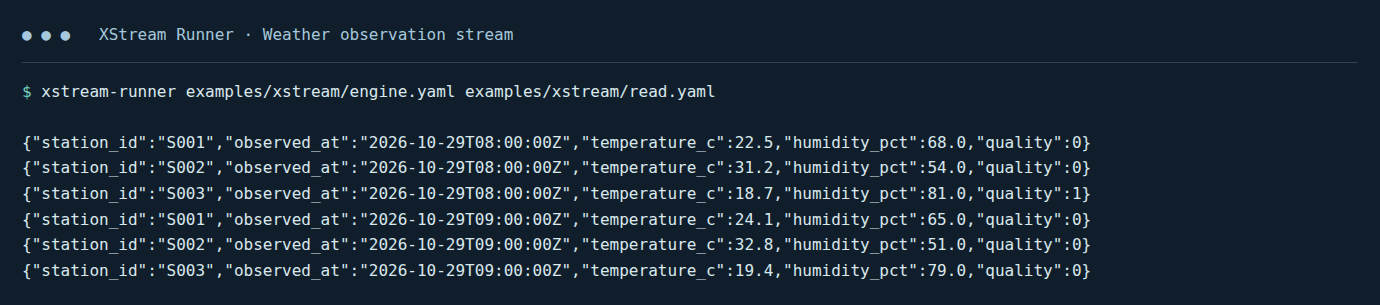
Use the Runner output to check whether the Job completed and inspect the reported result information. For graphical editing, the Designer guide includes an overview screenshot and a parameter-editor screenshot.